Latest Products


Contact Us
- No.116, Changda Rd, Yuhang District, Hangzhou, Zhejiang, China
- eva@conloon.com
- +86-571-81600072

Industrial Commercial Dehumidifier
Micro-computer humidity setting, automatic induction, automatic control.
Description
INDUSTRIAL COMMERCIAL DEHUMIDIFIER


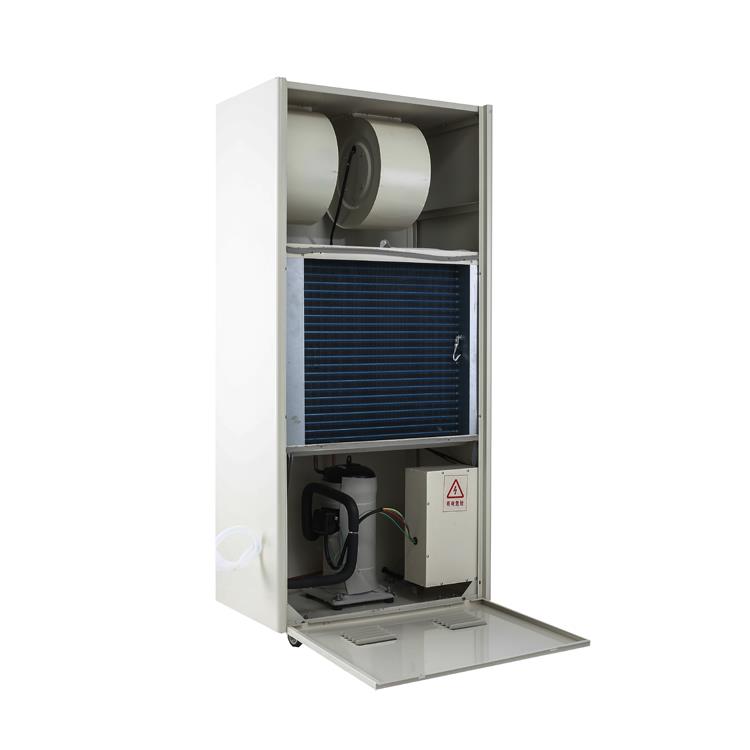
DEHUMIDIFIER USER MANUAL
DH-5240C
Please keep this manual for further reference
Dear customers:
Thank you for selecting this dehumidifier for your home and your family companion. This manual will show you the proper use and maintenance of this dehumidifier. Please take a few minutes to read this manual to become familiar with the entire performance.
The dehumidifier will remove excess moisture from the air, creating a comfortable environment for your home and office. Its compact design allows you to easily move it to every room.
1. Carefully read the instruction manual and pay attention to the following safety instructions.
2. Keep the construction manual for future reference.
3. Check whether the mains voltage matches the one on the label of the device.
4. The dehumidifier must not be covered when used. Do not put clothes or other object on it . Only use the dryer on sturdy and even ground.
5. Repairs must be carried out by qualified experts with appropriate knowledge about the product.
6. Do not put the device close to sources of heat,like radiators,radiant heaters etc.
7. Don't expose the product to direct sunlight or bad weather,like wind,storm& rain.
8. Do not use the products close to chemicals and acids. Those might damage the device.
9. When the machine drains, make sure that the hose is not bent and the water can flow through unhindered.
10. Make sure not to damage or run over cables when moving the device.
11. Protect the device from splashing water.
12. Unplug the device if problems like smell of burning occur while using it.
13. Only use 380V AC connection.
14. This appliance is intended to be used by expert or trained users in shops, in light industry and on farms,or for commercial use by lay persons.
15. The A-weighted emission sound pressure level at workstations does not exceed 70dB,the peak C-weighted instantaneous sound pressure value at workstations does not exceed 63Pa.
16. The product should be every side away from the wall at least 1 meter.
17. This appliance is not intended for using by persons (including children) with reduced physical,sensory or mental capabilities, or lack of experience and knowledge,unless they have been given supervision or instruction concerning use the appliance by a person responsible for their safety.
18. Children should be supervised to ensure that they do not play with the appliance.
19. If the humidity of the working environment is less than 30%, the use of the dehumidifier is not recommended.
This dehumidifier is automatic controlled,the adjust humidity is between 10% to 95% .
Function of keys:
1. ON/OFF-key: Turn the device on and off.
2. ‘Up/down’-keys: Set the desired moisture level. Keep pressing the up- or down- key (the value will run fluently towards the chosen direction) and let go when the desired value is reached.
3. Computer protection:
a. Self-defrosting protection: compressor stops working, fan continues to work when self-defrosting.
b. Compressor delay function: compressor stops, it will start to work after 3 minutes .
c. Fault code: see the below fault code indication.
Name | Dehumidifier |
Model | DH-5240C |
Min./Max.Temperature | 5℃-35℃ |
Dehumidify Capacity | 240 L per day |
Voltage | 380V~50Hz |
Power | 4.8KW |
Cooling agent | R410A |
Current | 8.3A |
Net weight | 148kgs |
Dimension | 780x470x1690mm |
l The compressor turns itself on three minutes after turning on the dehumidifier.
l The ideal temperature for the dryer to work in is from about +5℃ up to about +32℃.
l When the device defrosts the cooling fan works properly but the inserted compressor switches itself off.
l It is recommended to clean the filter once a month. Carefully clean it with clear warm water.
l Leave a safe distance between wall and air in- and air outlets.
l If any fault code appears,please power off the machine immediately.
l It may short the service life if the machine runs from 24 hours continuously.
At low temperatures the device will start defrosting automatically. During this phase the cooling fan works properly but the inserted compressor switches itself off. The ‘Automatic Defrosting’ symbol and the ‘FAN’-key flash.
NOTE:
l Do not tilt the device more than 45o,neither when moving nor when operating.
l If the dryer was tilted by accident,do not use it for a period of 12 hours.
ERROR | REASON | SOLUTION |
E1 | Coil Sensor-Error | Change the mode to defrost by timer. Cancel the error code . |
E2 | Temperature Sensor-Error | Change to be the mode of cretinous running |
E3 | Moisture Sensor-Error | Cancel the error code,temperature is too high |
E4 | System-Error | Refrigerant leaks / Tube blocked t |
E5 | Room Temperature is too high | Lower the room temperature and dryer will restart automatically |
E6 | Lack of phase, phase wrong | Lack of phase or the phase is wrong. Correct it |
E7 | Currency is too high | Correct the currency |
v If an error occurs,display will show the respective code.
ERROR | ERROR | SOLUTION |
Dryer does not work | l Device has no power l Mains plug is not plugged in properly l Display shows error code E4 | l Turn on the power supply. l Connect the mains plug properly |
Bad Dehumidify Performance | l Filter is dirty l Air in- or outlet is covered. l Room is not closed. Low moisture and temperature. | l Clean the filter. l Uncover Air in- and outlet l Close all doors and windows. l The lower the room temperature the worse the dehumidification performance. |
High Noise Level | l Device was not put on even ground l Air in - or outlet is covered | l Position the device on even ground l Uncover Air in- and outlet |
Hot Tags: industrial commercial dehumidifierChina, manufacturers, suppliers, factory, wholesale
You Might Also Like